Bates Numbering Performance: Optimize Large Document Processing
Processing thousands of pages efficiently requires optimization. Learn techniques to maximize Bates numbering performance, reduce processing time, and handle large document sets effectively.
Understanding Performance Factors
Bates numbering performance depends on multiple factors: document size, page count, PDF complexity, hardware capabilities, and software efficiency. Understanding these factors helps optimize your workflow for maximum speed.
Key Performance Factors
Document characteristics:
- Page count: More pages = longer processing time
- File size: Larger files take longer to read and write
- PDF complexity: Images, fonts, and graphics affect speed
- Compression: Highly compressed PDFs require more CPU
- Security: Encrypted PDFs add processing overhead
Hardware factors:
- CPU speed: Faster processors = faster processing
- RAM: More memory allows larger documents
- Storage speed: SSD vs HDD affects read/write speed
- Multi-core: Parallel processing utilizes multiple cores
Software factors:
- Algorithm efficiency: Well-optimized code processes faster
- Memory management: Efficient memory use prevents slowdowns
- Parallel processing: Multi-threading improves speed
- Caching: Reusing computed results saves time
Performance Baseline
Modern tools process 100-300 pages per minute on typical hardware. A 1,000-page production takes 3-10 minutes. If your processing is significantly slower, optimization opportunities exist.
Optimization Techniques
Document Preparation
Prepare documents before processing to improve speed:
Optimize PDFs:
- Reduce file size: Compress images and remove unnecessary elements
- Flatten layers: Merge layers to simplify structure
- Remove security: Decrypt password-protected PDFs first
- Fix corruption: Repair corrupted PDFs before processing
Organize efficiently:
- Batch similar documents: Group documents with similar characteristics
- Remove duplicates: Eliminate duplicate files before processing
- Sort by size: Process smaller files first for quick wins
- Verify completeness: Ensure all files are valid PDFs
Processing Strategy
Chunking large sets:
- Divide large productions into batches of 100-500 documents
- Process batches sequentially or in parallel
- Easier to verify and troubleshoot smaller batches
- Reduces memory pressure
Parallel processing:
- Process multiple documents simultaneously
- Utilize multi-core processors effectively
- Can achieve 2-4x speedup on modern hardware
- Most effective for large document sets
Incremental processing:
- Process pages incrementally rather than loading entire PDF
- Reduces memory requirements
- Enables processing of very large documents
- Provides progress feedback
Hardware Optimization
Maximize available resources:
- Close other applications: Free up RAM and CPU
- Use SSD storage: Faster read/write speeds
- Adequate RAM: 8GB minimum, 16GB+ recommended
- Modern CPU: Multi-core processors provide best performance
Performance comparison:
Processing 1,000 pages:

Budget laptop (4GB RAM, HDD): 15-20 minutes
Mid-range laptop (8GB RAM, SSD): 5-8 minutes
High-end workstation (16GB+ RAM, SSD): 3-5 minutes

Hardware significantly impacts performance
Tool-Specific Optimization
Desktop Software Optimization
Adobe Acrobat Pro:
- Use batch processing features
- Disable unnecessary plugins
- Allocate more memory in preferences
- Process locally rather than over network
Specialized litigation software:
- Configure parallel processing settings
- Adjust quality vs speed tradeoffs
- Use optimized rendering engines
- Enable hardware acceleration if available
Browser-Based Tool Optimization
BatesFast and similar tools:
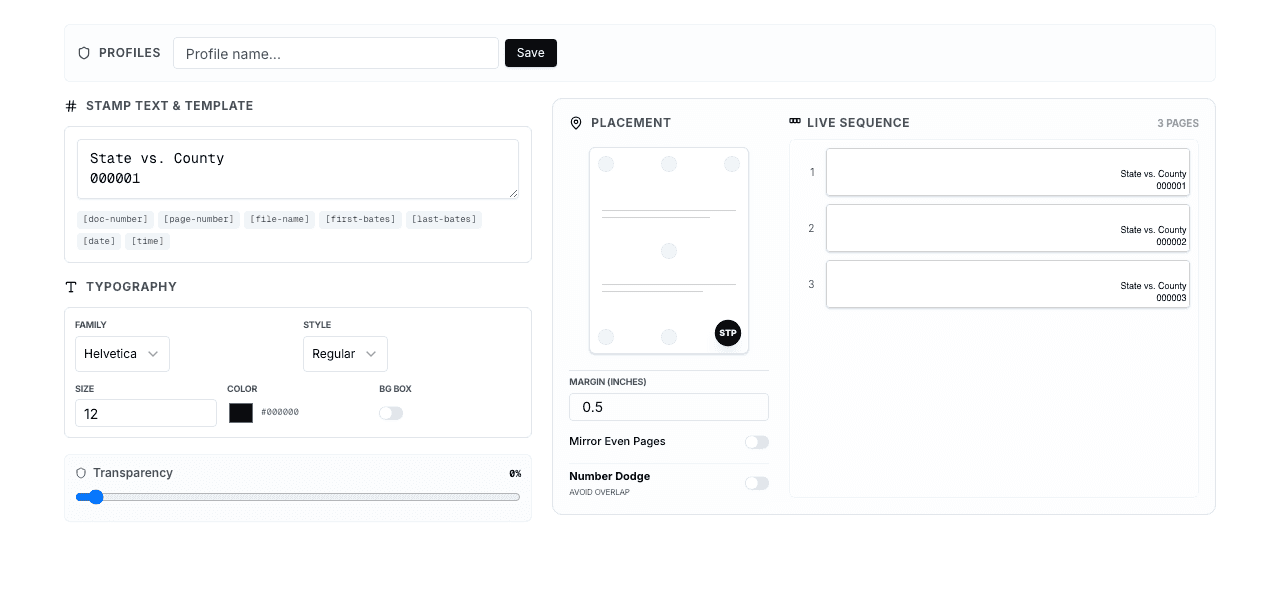
- Use modern browsers: Chrome, Firefox, Edge with latest updates
- Close other tabs: Free up browser memory
- Enable hardware acceleration: Use GPU for rendering
- Adequate browser memory: Increase if processing large files
Browser settings:
- Clear cache before large processing jobs
- Disable unnecessary extensions
- Use incognito/private mode for clean environment
- Ensure JavaScript is enabled and optimized
Network Considerations
Local vs network processing:
- Local files: Always faster than network files
- Copy to local drive: Copy network files locally before processing
- Save to local drive: Write output locally, then copy to network
- Network speed: Slow networks create bottlenecks
Performance impact:
Processing 500 pages:

Local SSD: 3 minutes
Network drive (1 Gbps): 8 minutes
Network drive (100 Mbps): 25 minutes

Always process locally when possible
Handling Very Large Document Sets
10,000+ Page Productions
Strategies for massive document sets:
1. Divide and conquer:
- Split into batches of 500-1,000 pages
- Process batches sequentially
- Track progress carefully
- Verify number continuity between batches
2. Parallel processing:
- Process multiple batches on different computers
- Assign non-overlapping number ranges
- Merge outputs maintaining sequential order
- Requires careful coordination
3. Overnight processing:
- Start large jobs at end of day
- Let processing run overnight
- Review results in morning
- Frees up daytime for other work
4. Professional services:
- Consider outsourcing very large productions
- Litigation support vendors have industrial-scale capacity
- Cost-effective for occasional massive productions
- Faster turnaround than in-house processing
Memory Management
Preventing memory issues:
- Monitor memory usage: Watch for memory exhaustion
- Process in chunks: Don't load entire production into memory
- Clear cache: Release memory between batches
- Restart periodically: Fresh start for each major batch
Signs of memory problems:
- Processing slows dramatically
- System becomes unresponsive
- Application crashes
- Error messages about memory
Solutions:
- Reduce batch size
- Close other applications
- Upgrade RAM if processing large sets regularly
- Use 64-bit applications (no 32-bit memory limits)
Performance Benchmarking
Measuring Performance
Key metrics:
- Pages per minute: Primary performance indicator
- Total processing time: End-to-end duration
- Memory usage: Peak memory consumption
- CPU utilization: How efficiently CPU is used
Benchmark test:
Test document: 100 pages, typical complexity
Measure: Time to complete processing
Calculate: Pages per minute (100 / minutes)

Good performance: 150+ pages/minute
Acceptable: 80-150 pages/minute
Needs optimization: <80 pages/minute
Comparing Tools
Performance comparison factors:
- Use identical test documents
- Test on same hardware
- Measure multiple runs for consistency
- Consider both speed and quality
Typical performance ranges:
Desktop software: 150-300 pages/minute
Browser-based (WebAssembly): 100-250 pages/minute
Pure JavaScript: 20-50 pages/minute
Cloud-based (with upload): 50-100 pages/minute

Modern tools achieve excellent performance
Best Practices for Performance
Performance Optimization Checklist
- Prepare documents: Optimize PDFs, remove duplicates, verify files
- Use local storage: Copy files locally before processing
- Close other applications: Free up system resources
- Batch appropriately: 100-500 documents per batch
- Use modern tools: WebAssembly or optimized desktop software
- Monitor progress: Watch for slowdowns or issues
- Verify results: Check quality after optimizing for speed
Frequently Asked Questions
How fast should Bates numbering be?
Modern tools process 100-300 pages per minute on typical hardware. A 1,000-page production should take 3-10 minutes. If significantly slower, optimization opportunities exist. Very large documents (1000+ pages) may process slower.
What's the biggest performance bottleneck?
Network storage is often the biggest bottleneck. Processing files over network drives can be 5-10x slower than local processing. Always copy files to local storage before processing, then copy results back to network storage.
How can I speed up processing of large document sets?
Divide into batches of 100-500 documents, process locally (not over network), close other applications, use modern tools with parallel processing, and consider processing overnight for very large sets. Parallel processing on multiple computers can provide dramatic speedups.
Does browser-based processing match desktop software speed?
Modern browser-based tools using WebAssembly achieve 80-95% of desktop software performance. For most users, the difference is negligible—perhaps 30 seconds on a 500-page document. The convenience advantages often outweigh the minor speed difference.
How much RAM do I need for Bates numbering?
8GB RAM is minimum for typical document processing. 16GB+ is recommended for large productions (1000+ pages) or processing multiple documents simultaneously. More RAM allows processing larger documents and reduces slowdowns from memory pressure.
Can I process documents faster by reducing quality?
Some tools offer quality vs speed tradeoffs (lower resolution rendering, reduced compression). However, for legal documents, maintain high quality. The time savings are usually minimal compared to the risk of quality issues. Optimize workflow instead of sacrificing quality.
What should I do if processing is very slow?
Check: (1) Are files on network storage? Copy locally. (2) Is RAM exhausted? Close other applications or reduce batch size. (3) Is CPU maxed out? Close background processes. (4) Are PDFs corrupted or overly complex? Optimize PDFs first. (5) Is tool outdated? Update to latest version.
Should I outsource very large productions?
For productions over 10,000 pages or when time is critical, consider professional litigation support vendors. They have industrial-scale capacity and can process massive document sets quickly. Cost-effective for occasional large productions versus investing in high-end hardware.
Conclusion
Optimizing Bates numbering performance transforms document production from a time-consuming bottleneck into an efficient workflow. By understanding performance factors, preparing documents properly, using appropriate tools, and implementing optimization techniques, you can dramatically reduce processing time.
The key is matching your approach to your document volume. Small productions (under 500 pages) work fine with basic optimization. Medium productions (500-5,000 pages) benefit from batching and local processing. Large productions (5,000+ pages) require systematic optimization and possibly parallel processing or professional services.
Modern tools like BatesFast with WebAssembly technology provide excellent performance without expensive hardware or software investments. Combined with proper optimization techniques, they handle most litigation document productions efficiently and professionally.
Experience Fast, Efficient Bates Numbering
Try BatesFast's optimized WebAssembly engine for professional performance without expensive software or hardware. Start with one free preview run, then $299 one-time purchase.
Try BatesFast Now